Guide: Your website, start to finish · Appendix, Where website settings live
Where every website setting lives
Find any website setting by searching Settings, and see which Settings page holds each one and when it goes live.
Website settings don't sit in the editor. Each one has a single page in Settings, most of them in the Website and online group. The Website settings card on Website → Overview links to them too.
Find any setting by searching
- Open Settings at the bottom of the sidebar.
- Type in Search settings at the top of the list, in your own words, like logo, domain or redirect.
- Each match says where it is, such as Logos, under Brand. Press Enter or click it, and the page opens at that setting.
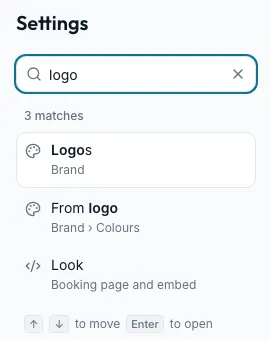
The search box at the top of the dashboard finds settings too, and old bookmarks to Settings tabs still open the right page.
Was this section helpful?
Where each website setting lives
| What you want to change | Where it is | When it goes live |
|---|---|---|
| Logos, tab icon, colours, fonts, voice, photos, social links | Settings → Brand | When you publish your website. On a site never published, the main logo and short description save to your shop at once |
| Design systems | Settings → Design systems (under Brand) | When you publish your website |
| Your free address, your own domain | Settings → Domains | Straight away; a domain once its DNS is live |
| Search titles, share picture, hiding from search, redirects | Settings → Search and sharing | After Save, within a few minutes |
| One page's search title and description | The editor's Page tab, or Pages and activities in Search and sharing | From the editor's Page tab: when you publish. From Pages and activities: after Save, within a few minutes |
| Booking page look, embed code and links | Settings → Booking page and embed | The Look card: when you publish |
| How much of your brand each customer page shows | Settings → Customer pages | Follows Brand |
| Google Analytics, Search Console, cookie banner, privacy page | Settings → Marketing and analytics | As you connect |
| Claude, ChatGPT or another AI that edits your draft | Settings → AI assistants | As you connect |
| Powered by Seascape, which embeds may show, Google tag ID, verification codes, Page not found | Settings → Advanced (a Custom HTML section itself is added in the editor) | Powered by Seascape and Page not found at once; codes and the tag ID after Save |
| Seats left, requesting a date | Settings → Booking rules | Straight away; the number for Only when few are left after Save |
| Opening hours in your footer | Settings → Locations | After Save Hours |
| Your other website (for From my website) | Settings → General | After Save |
| Who can see or edit the website | Settings → Users and permissions | Straight away |
Was this section helpful?
Still stuck?
Ask the assistant in Seascape
Signed in, it can also look at your own shop.
Send us a question
A person reads every one: support@seascape.bz